July 25 Operations Briefing — Local Files, Desktop Automation, and Agent Access That Ends
A practical operating model for local-file access, desktop automation permissions, OAuth revocation, and agent identity inventory.
DAILY NEWSLETTER · 2026-07-25 · LOCAL FILES · DESKTOP AUTOMATION · REVOCATION
July 25 Operations Briefing — Local Files, Desktop Automation, and Agent Access That Ends
An agent becomes consequential not only when it generates an answer, but when it opens a local file, clicks through a desktop workflow, and retains access after the task has changed. Today’s operating rule is simple: a file’s location does not create trust; control of a screen does not define a business scope; and granted access must have a verifiable end. NIST’s zero-trust principles and Google’s OAuth authorization and token-revocation documentation provide a grounded way to manage those three paths.
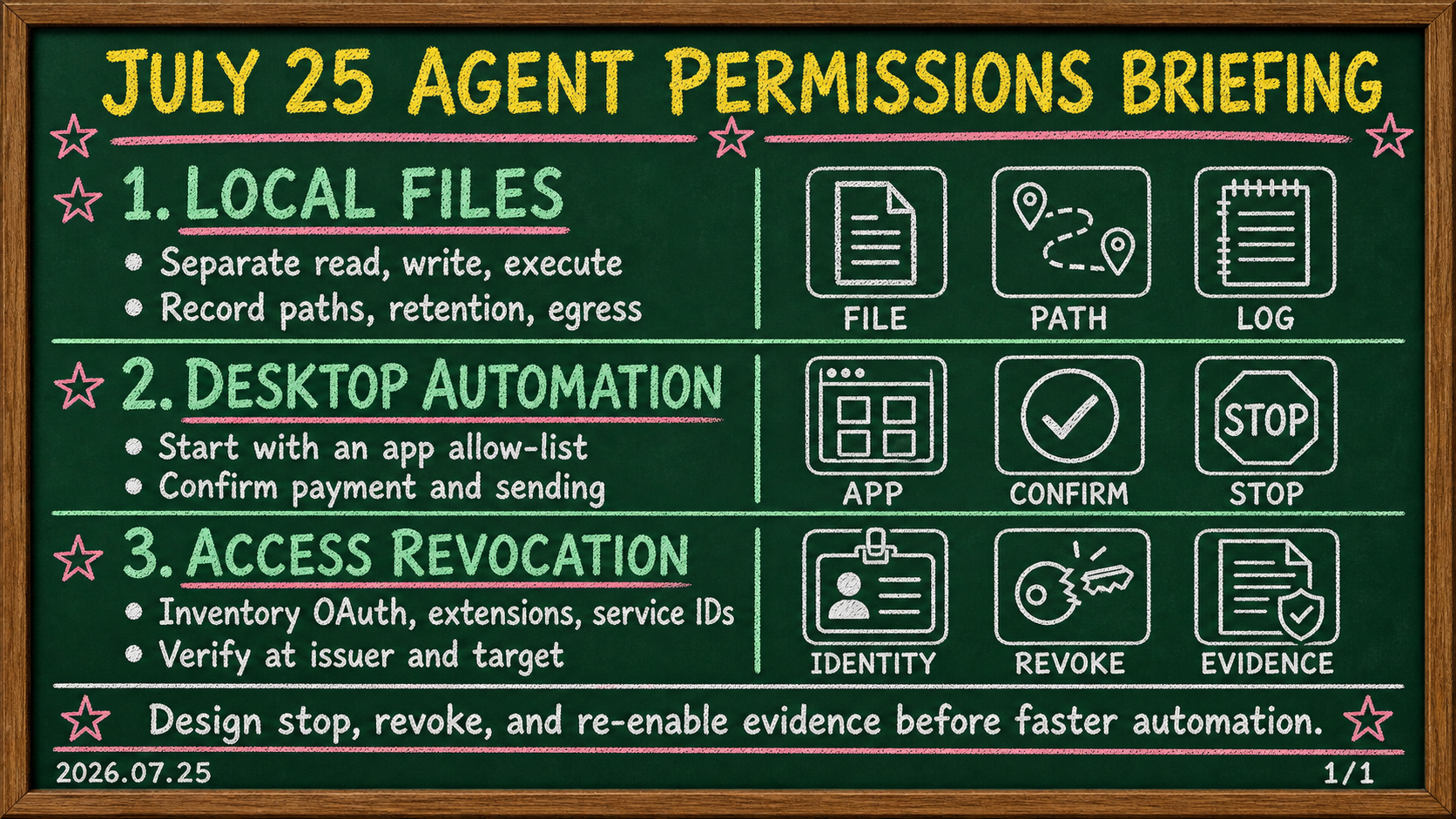
Orientation
First, do not treat a local disk as a trust boundary. NIST SP 800-207 says that zero trust grants no implicit trust to assets or user accounts solely because of physical or network location, or asset ownership. A local file an agent can read is therefore a resource whose subject, purpose, scope, and destination need to be stated. Second, desktop automation can act through a person’s screen without replacing the person’s approval and accountability. Third, an identity inventory is not a list of permissions; it connects OAuth tokens, scope, owner, a revocation path, and evidence that the old path no longer works. The procedures below are operational recommendations applying the cited sources, not claims that NIST or Google require the same UI, fields, or commands in every product.
- Break local-file access into protected resources and necessary actions.
- Limit desktop automation with least privilege, explicit approval, and observable stages.
- Give every agent identity a closed lifecycle: grant, use, revoke, and verify refusal.
1. Local-file permission should be decided by resource, subject, and action—not “my computer”
A common mistake is to treat files on a company laptop or in a work folder as inherently trusted. NIST SP 800-207 points in the opposite direction: zero trust moves defenses from static network perimeters to users, assets, and resources, and does not grant implicit trust based only on location or ownership. Applied to an agent, local placement is not an authorization rationale. It tells an operator where a resource lives, not whether an agent should be able to read, change, or transmit it.
Source · NIST CSRCSP 800-207, Zero Trust ArchitectureExplains that location and asset ownership alone do not grant implicit trust to assets or user accounts.The useful unit of review is a combination of a file set and a task, not a broad folder. If an agent summarizes meeting notes, permission to read those notes is different from permission to browse contracts, private files, or secrets in the same directory. Reading an input, indexing it, copying it, modifying it, deleting it, and attaching it to an outside service are also different actions. Record the subject, target, action, intended destination, and expiry for each task. The record does not enforce policy by itself, but it makes later review and containment possible.
Treat both file content and file path as potentially untrusted input. A sentence in a document, its name, its parent-folder name, or metadata can look like a direction to an agent. Separate discovering and reading a file from acting on instructions found in it. In an isolated test directory, use marker documents containing task-conflicting text. Observe whether the agent treats that content as data, proposes extra file discovery or tool calls, and stops before writing, deleting, or transferring. Customer material and production secrets are unnecessary for this test; recoverable test identities and low-sensitivity markers are safer and repeatable.
Also inspect where read results can travel. Permission to read a file for a summary does not imply permission to send the original or its derivative to every destination. Output folders, clipboards, chat integrations, browser uploads, error reporting, and indexing stores may each be a distinct destination. NIST explains that subject and device authentication and authorization are discrete functions before a session to an enterprise resource is established. Implementation differs by environment, but the principle discourages treating an access subject and its execution device as one assumed-trusted unit.
Source · NIST CSRCSP 800-207, Zero Trust ArchitectureStates that subject and device authentication and authorization are discrete functions before an enterprise-resource session.A compact card can contain file_set, subject_id, device_context, allowed_action, destination, approval, and expiry. Describe a narrow file set rather than a home directory. Distinguish read, create, modify, delete, and transfer. Keep raw tokens, passwords, and document contents out of the card; retain controlled references and log locations instead. Verify the card with one expected failure: attempt a disallowed subfolder read or an unapproved transfer of a marker file. Success means the operation does not occur and the subject, policy decision, and denial appear in reviewable records—not merely that a model emits refusal text.
2. Desktop automation must separate screen capability from business authority
AWS presents Amazon WorkSpaces for AI agents as managed workspaces in which agents can take action on desktop applications. That product context does not replace a team’s own authorization policy, but it shows how automation can extend to business desktop applications without APIs. The capability to operate a screen and the authority to perform a business action therefore need separate design.
Source · AWSAmazon WorkSpaces for AI agentsProvides product context for AI agents acting on desktop applications through managed WorkSpaces.A desktop agent can open a file chooser, use a browser session, copy and paste, and click a final button. That convenience can turn a single screen-control grant into access across many resources. NIST describes resources, assets, services, workflows, and network accounts among the things a zero-trust architecture protects. Instead of treating the desktop as one trusted surface, treat the files, web applications, sessions, upload destinations, and workflows reached through it as separate resources.
Source · NIST CSRCSP 800-207, Zero Trust ArchitectureFrames resources, services, workflows, and network accounts as objects to protect in a zero-trust architecture.The first boundary is role and execution scope. “Can operate a browser” is not authorization to use an HR system, financial service, personal mail, or an administrator console in the same way. Define the allowed application, account, domain, action, and maximum run time per task. An automation drafting a regular report may use one browser profile and one repository. Publish, payment, user addition, privilege change, and secret-display steps are harder to reverse or widen scope; put them behind an explicit human confirmation boundary.
The second boundary is login state. Google’s OAuth guide explains that an authorization request defines parameters identifying an application and the permissions it asks a user to grant. It also describes OAuth 2.0 as a way for users to share specific data with an application without sharing usernames, passwords, or other information. For desktop automation, this supports an operational preference for a purpose-defined application identity and needed scope over accidentally inheriting a person’s broad browser session. This is an application of the OAuth concepts, not a claim that Google’s web-server guide prescribes a design for every desktop agent.
Source · Google for DevelopersUsing OAuth 2.0 for Web Server ApplicationsExplains that authorization requests identify the application and requested permissions, and that OAuth shares specific data without sharing passwords.The third boundary is observation and stop behavior. Automations do not only encounter the happy path. Redirected sign-in pages, a new-domain pop-up, unexpected consent, a higher-level folder in a chooser, or an error-recovery screen can expand scope. Do more than list allowed window titles or domains: define that an unlisted state stops and hands off to a person. Retain the initiating identity, profile or device context, opened target, file-selection or upload state, approval step, stop reason, and result. Screenshots and logs may be sensitive, so their retention location and readers also need control.
Test in a low-risk isolated environment: a link to an unapproved domain, an account-selection screen, a write-permission dialog, and an attempt to attach a marker file outside the allowed path. The control should recognize the unexpected state and stop; where a tool call or upload was initiated, its outcome must be observable. Repeat the same cases after browser, policy, or agent-tool changes. A single successful demonstration cannot establish that a boundary survives the next update.
3. Revocation and identity inventory must verify refusal, not just delete a token
Agent access is not only a departure-day problem. Recheck identities when a project ends, scope changes, a desktop automation moves environments, a local-file test exposes an exception, or an integration changes. NIST says network location is no longer viewed as the prime component of a resource’s security posture. Running on an internal device is therefore not a sufficient reason to assume that old OAuth consent, service identity, browser session, or API connection remains appropriate.
Source · NIST CSRCSP 800-207, Zero Trust ArchitectureExplains why network location is not the prime component of a resource’s security posture.One inventory row needs more than the agent’s display name. Connect subject_id, owner, purpose, scope, credential_ref, device_or_runtime, last_review, expiry, revoke_path, and revoke_evidence. Use the actual identifier recognized by the directory or identity provider. Make an accountable person or role the owner. Record reachable resources and allowed actions, not only a role label. Keep a secure reference rather than a raw secret. If there is no technical expiry, use an explicit reapproval date so access does not silently look permanent.
Google’s guide describes access tokens and refresh tokens that can obtain new access tokens. It says refresh tokens are valid until the user revokes access or the refresh token expires, and it gives an example that POSTs a token to Google’s OAuth 2.0 /revoke endpoint. That exact endpoint and flow are Google OAuth details; do not assume another issuer uses the same path or behavior. The transferable operating requirement is to record an issuer-specific revocation path and a test that follows it.
A revoke drill is the shortest test that an inventory is a control. Select a low-risk test subject and first preserve evidence that access currently exists. Follow its revoke_path to withdraw or rotate the applicable consent, token, role, session, or key. Then verify in two places: the issuer should show cancellation, disablement, or rotation, and the target resource should reject a request using the old path. These checks are not duplicates. An issuer-side status change alone does not establish that a cached session or derived access at a target has ended, while a temporary target error does not prove revocation.
Make revoke_evidence more than a ticket number. Link time, operator, issuer-side confirmation, target-side refusal, rotated reference or state, remaining exception, and next review date. Keep a failed revocation attempt visible; it is evidence of an open route for the next operator. Classify identities with no owner or no revocation path as work to resolve before connecting another file source or desktop automation. Inventory quality is not the number of rows. It is whether every row can explain how its access ends.
Operator memo
Create three small cards today. On the first, split one local-file task into read, write, and transfer, then state its file set, subject, destination, approval, and expiry. On the second, state one desktop automation’s allowed application, account, domain, irreversible-action approval point, and stop condition. On the third, complete subject_id through revoke_evidence for one real or test agent. They do not need to be finished policy documents, but blank owners, broad file scopes, unknown destinations, and missing revoke paths must stay visible.
Then run one revocation drill. Let a safe test identity perform a permitted local-file or narrow desktop task, revoke its relevant credential path, and verify that the old request is refused at the target as well as changed at the issuer. Attach those results and their log locations to the same inventory row. This small exercise turns local-file control, screen-automation approval, and identity closure from separate checklists into one operating sequence.
Today’s conclusion
The July 25 conclusion is to stop judging agent authority by location or screen convenience. A local file is a protected resource, desktop automation is a bounded business task rather than universal screen authority, and OAuth or other identities are access paths that require revocation and evidence of refusal after use. NIST’s zero-trust principles challenge implicit trust; Google’s OAuth documentation supplies concrete context for scoped authorization and token revocation.
If only one action is possible today, choose one low-risk agent, document its file and desktop scope, and run its revoke path. Preserve evidence that the old path is refused by the target resource. An operation that can demonstrate how access ends does not need to grant broad authority by default when the next automation starts.
Sources
Related posts
Read →Related tools